HOME/BLOG/YOU DON'T HAVE TO BECOME A YOUTUBER: MAKE VIDEOS FOR YOUR BUSINESS WITH CLAUDE
AI Building
You Don't Have to Become a YouTuber: Make Videos for Your Business With Claude
I paid $11,000 to edit one film in 2010. Here are the five videos your business actually needs, and how to make them with Claude.
October 18, 2026|5 min read
In 2010, I made a movie.
It was called Women in Business 2.0, and I interviewed ten women who were building businesses online. One was in Northern California, the rest were in Southern California, and one woman actually flew out just to sit down with me.
I'd only been in business for two years at that point, and internet marketing was a very male space (more so then than now, if you can imagine that). I'd already started a Facebook group called Women of Internet Marketing back in the early days of Facebook groups, and the film felt like the next step. I wanted to put women in front of the camera and let people hear from them.
I had connected with a couple of filmmakers, and we did a barter: I built a website for them, and in return, they were going to help me produce a movie about women in business. Then the filmmaker bailed on me right before we started.
He literally came to my house, showed me how to use the equipment, and left me to it. I remember standing there thinking, "Shit... is this going to look unprofessional?"
So I did what you do when you're two years into business and determined... I recruited my neighbor's husband as my film guy for the Northern California interview, then reached out to a childhood friend who was a photographer for the Southern California interviews, loaded up the gear, and did the interviews.
The filming turned out to be the easy part.
Getting it edited cost me over $11,000, all of it for one editor. And when I shipped the finished DVDs to people, some of them didn't play (it's been 16 years, and it was stressful at the time, so I don't remember the exact technical issue).
She didn't know how to handle the encoding, so I'd paid all that money for a disc that some people couldn't play (I, of course, tested it and it played fine, but "stressful" is an understatement).
I sold it, but I never made my money back, and I was never really happy with the editing for what it cost. But at the time, every correction, adjustment, etc. would have cost more money.
I'm glad I did it, though. Some of the women were wonderful about promoting it, and it's where I first connected with Denise Wakeman, who I'm still friends with online all these years later (she's wonderful and a genuinely great person; be sure to follow/subscribe if you haven't).
Later, I did something similar-ish with the Content Creator Summit, where I interviewed 18 people. That one sold the all-access pass and made money, but the editing was a beast all over again. Not to mention, summits feel like way more work than they're worth (IMO). I know people are still doing them, and if you love them, I wish you all the success in the world.
I wouldn't touch a summit with a ten-foot pole today, and I know I wouldn't make another film like Women in Business 2.0 either.
It's not that the projects weren't worth anything. It's that I know exactly how much time and money that kind of production eats, and I'd rather spend both somewhere else.
But here's what I didn't know back then: most of the video a business needs was never documentary-sized in the first place.
✔️ A trailer for your new offer.
✔️ A 30-second explainer of the framework you teach.
✔️ A walkthrough that shows a new customer where everything is.
None of that needs a film crew, an $11,000 editor, or a disc that may or may not play.
And this past week, I've been making those kinds of videos with Claude.
Not just editing footage I recorded, either. I've been creating fully animated motion graphics, working from websites and application code, and experimenting with videos that would have required a whole lot more software (and patience) not that long ago.
I want to show you what's possible, but more importantly, I want to help you figure out which video would actually be useful for your business.
Because there's a difference between being excited that AI can make a video and having a good reason to make one.
You don't have to become a YouTuber to use video
I love YouTube, and I'm getting back into creating videos for my own channel.
But when I talk with friends who run businesses, many of them have no interest in becoming YouTubers.
They don't want to spend every day figuring out what to post, chasing trends, or filming reels in the hope that something takes off. They want to reach the right people, explain what they do, help customers, and sell the things they've worked hard to create.
Video can do all of that without becoming a separate business you have to manage.
Think about where people interact with your business. They land on a page and don't quite understand what you offer. They subscribe to your newsletter but aren't sure whether your approach is right for them. They buy something and have no idea where to start.
A short video might help in each of those situations. And unlike a social post that gets buried in the feed, a useful video on your sales page or inside your customer welcome experience can keep doing its job.
That's what interests me most about all of this.
I don't want to make more videos simply because making them has become easier.
I want to make videos that have somewhere useful to live.
What kinds of videos does your business actually need?
I started thinking about video in terms of five stages:
Get seen → Build trust → Sell → Onboard → Keep customers.
Each stage has a different job, and the best video for one stage might be completely wrong for another. I had Claude turn the framework into a short motion graphic. The first version was about ten seconds long, which was lovely except that nobody could read it. 😂
I asked Claude to slow it down and highlight each stage as it appeared. Then I added music.
Here's the finished version.
Watch how the different video types appear underneath each stage. You don't need to remember all of them. Just notice which stage makes you think, "Hmmm, I could really use some help there."
Let's look at each one.
1. Get seen
These videos introduce you to people who haven't heard of you yet.
This is where Shorts, Reels, article trailers, and short animated ideas can be useful.
But the goal isn't necessarily to get a million views. It's to reach people who might actually care about what you teach, sell, or build.
For example, a consultant could create a 30-second animation showing a common mistake her ideal clients make. A writer could animate the main idea from an article. A product creator could turn one useful feature into a quick visual demonstration.
You don't always have to appear on camera, either.
2. Build trust
Once someone finds you, they want to understand how you think and whether you can help them.
This is where I love framework explainers.
If you've developed a method for working with clients, planning content, evaluating an offer, or solving a particular problem, you can turn that process into a visual explanation. I did this with the AEO/SEO scoring system I use on my articles. Instead of simply describing the different parts of my scoring process, I had Claude animate them (this was just a test to see how Claude's new motion graphics work; then it converted it to an MP4).
You can also use video for behind-the-build clips, demonstrations, or customer testimonials you have permission to share. You're giving people a chance to understand your approach before they decide whether to work with you.
3. Sell
This is the stage I'm especially interested in right now.
How many sales pages have you visited where you scroll through a mountain of copy and still aren't quite sure what the product does?
A short explainer or demo can help.
For SaySo, the digital storefront platform I'm building, I've had Claude create animated product clips and walkthroughs from the application itself. I've also been testing a 3D landing-page fly-over, where the page appears to lie on a surface, and the camera moves along it.
It's ridiculously fun to watch, but I'd put one on a sales page for more than just looks. It's because it can help somebody understand the product more quickly.
A sales video needs to answer questions, demonstrate something useful, or make the offer easier to understand. Otherwise, it's decoration.
4. Onboard
Someone just bought your product or joined your community.
Now what?
This is one of the most overlooked uses of video, particularly for small businesses. You could create a 60-second welcome video that shows where to start, walks through the three most important features, or briefly explains how to get a first result.
I've been creating tutorial videos for the tools inside SPARK Lab, my community for people building business assets with AI.
I narrated them, but Claude handled production. Those tutorials aren't designed to go viral. They're there to help someone who has already joined.
And if they make it easier for members to get results without waiting for me to explain everything individually, that's an excellent use of video.
*Side note: I got all twelve of those videos completed, start to finish, part-time over one weekend. That would have taken SO much longer without Claude.
5. Keep customers
There's a whole category of videos that come after the sale.
Feature announcements, new resource walkthroughs, updates, community highlights, and videos that help people discover something they already have access to.
Think about how often you add something to a product or membership and then wonder whether anyone has noticed. A short video can show what's new and why people might want to use it.
Not every video needs to attract a new customer. Some should make existing customers happier they bought from you.
How do you choose which video to make first?
This is where I think people can save themselves a tremendous amount of time.
Instead of asking, "What video should I make?" ask:
"Where are people getting stuck in my business?"
Let's use three hypothetical businesses.
1. The coach who gets inquiries but not bookings
Imagine you're a business coach. People visit your website, read your emails, and even ask questions about working with you. But they're not booking. Before making another Reel about productivity, I'd look at whether people understand the coaching offer.
What happens during the sessions?
Who is it for?
What does someone walk away with?
A 60-second offer explainer on the sales page could walk people through the experience and help them decide whether it's right for them.
Business stage: Sell Video to make: A short offer explainer Where it lives: The coaching sales page and follow-up emails
2. The digital product seller answering the same questions every week
Now imagine you sell a template, planner, or digital tool.
People are buying it. Fantastic!
But you keep getting emails asking how to access it, where to start, or how to customize it. You probably don't need another promotional video as urgently as you need a good onboarding tutorial.
Record or generate a short walkthrough of the first few steps, put it on the welcome page, and include it in the delivery email.
Business stage: Onboard Video to make: A first-steps tutorial Where it lives: The customer welcome experience
3. The consultant whose method is difficult to explain
Let's say you've spent years developing a process that helps clients solve a problem. You're great at explaining it in person, but putting it into a few paragraphs on your website is another story.
This would be a perfect opportunity for an animated framework. Show the stages, how they're connected, what happens in each one, and what changes by the end.
It gives people a way to understand the value of your experience before they've ever booked a call.
Business stage: Build trust Video to make: An animated framework explainer Where it lives: Your website, newsletter, and relevant articles
I love these examples because none start with a platform.
We aren't asking whether the coach should be on TikTok or whether the consultant needs a YouTube channel. We're looking at a problem, choosing a video that might help, and putting it where it can do some work.
That approach is a lot more manageable for a solopreneur.
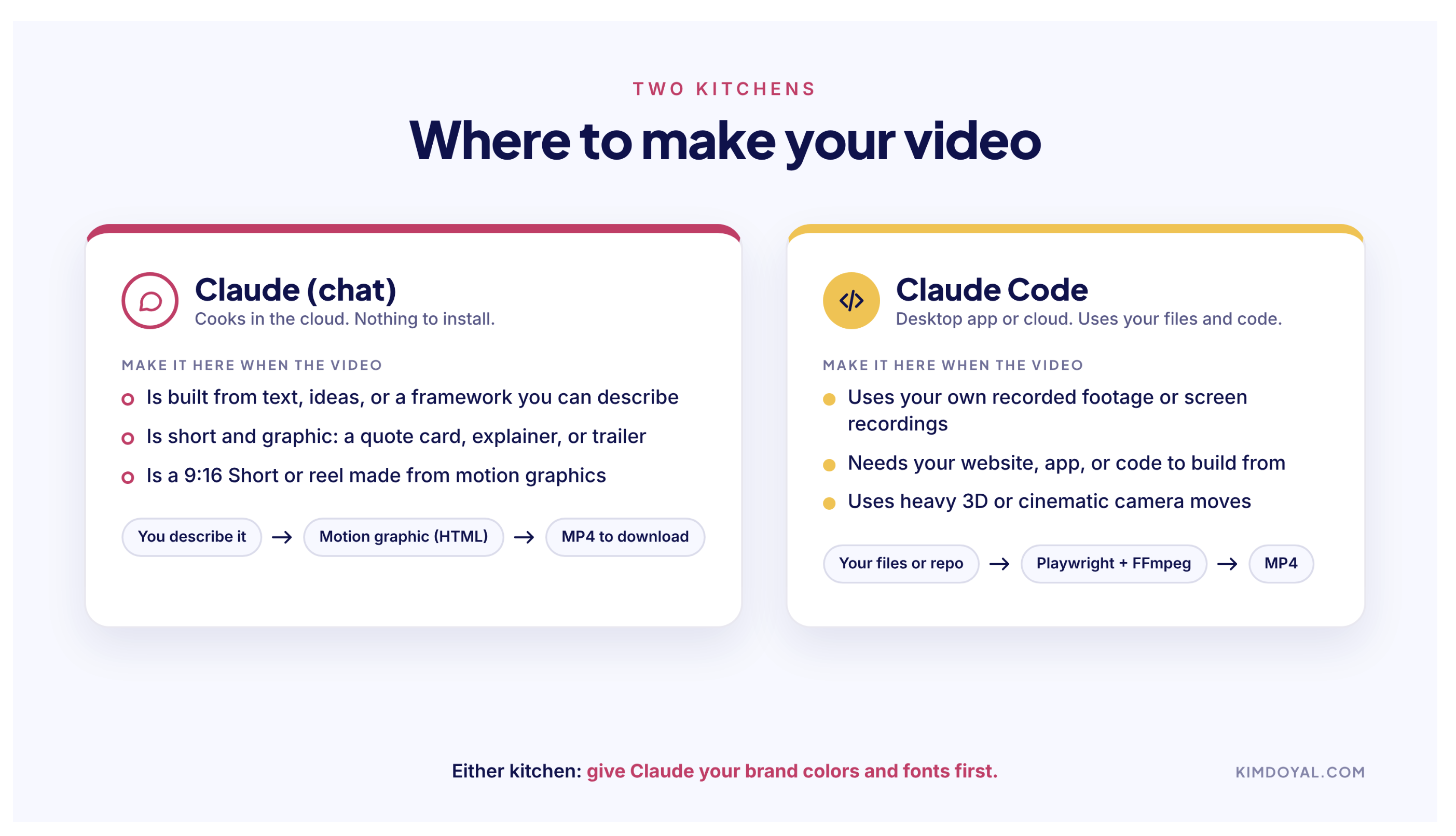
Claude or Claude Code: where do you make your video?
Here's where things can sound more technical than they need to.
I think of it as two kitchens.
Start in a regular Claude chat for motion graphics, and move to Claude Code when the video needs your own footage, your website, or your code. Either way, give Claude your brand colors and fonts first.
Kitchen one: regular Claude chat
This is the kitchen where you walk in, describe what you want, and ask Claude to make it. You don't necessarily need an existing video file.
Maybe you've got a four-step framework you want to animate, a quote from your newsletter, or a process you want people to understand. Claude can help you plan the animation and, when the appropriate file-creation and execution tools are available, build and render it into a video.
You might start with an animated HTML preview, refine it, and ask for an MP4 to download. That's how I created my five-stage business video map.
I described the idea, gave Claude my brand information, reviewed what it made, and asked for changes.
I didn't manually add keyframes or edit a timeline.
The important thing is that video rendering depends on which capabilities and tools are available in your Claude environment. If yours can't export an MP4 directly, you may need a code-based workflow or another rendering tool.
Kitchen two: Claude Code
Claude Code can work with a project, its code, and files it has permission to access. This is where I've been doing more involved projects.
For example, I can give Claude Code footage I've recorded, point it toward a website or application repository, or ask it to work with a collection of video assets.
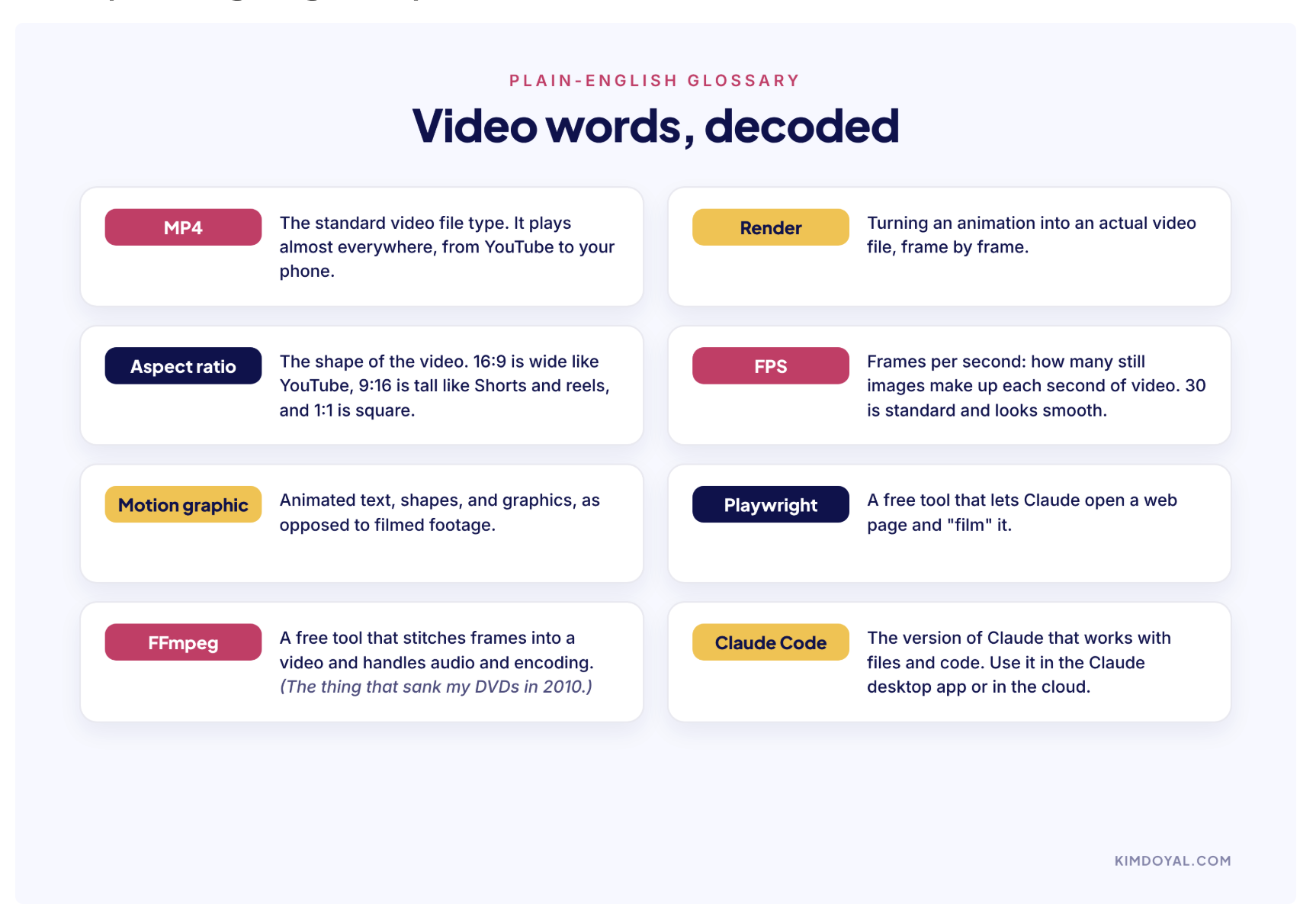
It can use tools such as Playwright to capture browser content, FFmpeg to process and encode video, and Remotion to create animations programmatically. The actual tools depend on the project and what's installed.
I use the Claude desktop app, so I don't have to spend my day working in a terminal just to make a video. I also have Remotion and FFmpeg installed, and I've been experimenting with motion libraries to create more sophisticated effects (Claude will automatically install these for you, so don't worry about installing them or how they work).
I wouldn't tell a beginner they must install any of that before making their first video. Start with the simplest environment that can create what you need. Add complexity when there's a reason.
My practical rule
For a short animation built from text, shapes, and an idea you can describe, I'd try regular Claude chat first. For footage you've recorded, a project that uses your existing code, or a video that needs more advanced production control, Claude Code is a good place to work.
And if you're unsure, ask Claude what it needs before you start.
That question has saved me a lot of guessing.
I made the five-stage video with Claude. Here's how.
I want to walk through the actual process because I think it's much less intimidating when you see how conversational it can be. I started by telling Claude what I wanted to communicate.
I had five stages of a business, different kinds of video for each one, and a visual style already established for my brand. I wanted a short motion graphic I could embed in this article. Because I was working inside a Claude project with my brand information, it already had context about my colors and fonts.
If you haven't created a brand reference yet, I'd absolutely recommend it. Even a simple document with your hex colors, fonts, logo files, and a few examples of designs you like will help (and if you need more help in this area, check out AI Meets Girlboss. Pinkie will absolutely get you started in the right direction with branding).
Otherwise, AI might give you something attractive that looks nothing like your business.
Claude created the first version, which was about ten seconds long. It looked good! Unfortunately, the information moved so quickly I couldn't read most of it. So I asked it to extend the animation and change how each stage appeared.
Instead of showing everything at once, I wanted one stage to expand and stand out while the others faded back. The revised animation lifted each stage onto a card and introduced its video types one at a time.
Much better.
Then I attached an MP3 from my music library and asked Claude to use it as the background track with a fade at the beginning and end. That was my production process. I didn't have a perfect script before I started. I didn't know exactly what every animation should look like. I had a clear idea of what the viewer needed to understand, and I kept giving feedback until it worked.
That willingness to experiment is probably the most useful skill you can bring to this.
Your first business video: a simple workflow
If you've never done this before, I'd start small.
Choose one idea you can explain in 15–30 seconds. A short framework, a common mistake, a quick comparison, or a simple announcement.
You can always make something more elaborate later.
Here's the workflow I'd follow.
Step 1: Give the video a job
Before you open Claude, write down three things:
Who is this video for?
What should someone understand after watching it?
Where will the video live?
For example:
This is for new subscribers who don't understand my three-step content planning process. I want them to understand the three steps, and I'm going to embed the video in my welcome email and introductory article.
That's already a useful creative brief.
Step 2: Choose the format
Do you need a motion graphic, a product demonstration, your face on camera, or a combination?
The format should help communicate the idea. A process is often easier to understand when animated. A product feature might benefit from seeing the actual interface. A personal story might work better with you talking to the camera. You can even combine them.
For this article, I'm experimenting with recording myself in QuickTime, then having Claude incorporate that footage alongside animated examples.
One layout I've been testing gives the walkthrough about three-quarters of the screen and my talking-head footage the other quarter. I get to explain things in my own voice without manually editing the whole production.
Step 3: Give Claude the brief
Here's a starter prompt you can copy and customize.
PROMPT: MAKE MY FIRST BUSINESS VIDEO
I want to create a short video for my business.
Business goal: [Get seen, Build trust, Sell, Onboard, or Keep customers]
Audience: [Who it's for]
What I want the viewer to understand: [One clear takeaway]
Where the video will live: [Sales page, email, article, social media, customer dashboard, etc.]
Video format: [Motion graphic, product demonstration, talking head, or a combination]
First, recommend a visual approach and produce a short storyboard showing what appears in each scene.
Keep the video focused on one idea. Make the on-screen text easy to read and allow enough time for each point.
After I approve the direction, build the animation using the tools available in this environment and render an MP4 if possible.
If you need files, tools, permissions, or additional information, tell me before starting.
Feel free to make this your own. The point is to give Claude a useful starting direction, not to memorize a particular prompt.
Step 4: Review the first version
Please don't expect your first render to be perfect. Mine wasn't.
And I'd rather spend a few minutes giving feedback than spend an afternoon trying to anticipate every tiny production decision before I've seen anything.
Here are a few examples of feedback you can give Claude:
If the text moves too quickly:
Slow down the transitions and let each section remain on screen long enough to read. Don't remove information; adjust the timing.
If the animation feels too cluttered:
Simplify the visual design. Reduce decorative elements and use more negative space. Make the main takeaway the focal point.
If the video looks generic:
This feels too much like a template. Use my brand references, reconsider the composition, and give the animation a more distinctive editorial style.
If the ending is weak:
Let the final message land. Give it a clearer visual reveal and hold the end card for a few seconds.
I've also learned to be specific about sound. I recently created a motion graphic with Claude Code and asked for subtle sound effects. The result was a little too whimsical for me, almost like sitting in a Japanese garden, which is lovely, but didn't quite go with the theme of the video. 😂
So I had it try a more restrained, modern sound treatment.
That's another part of learning to direct AI. Words like warm and gentle might produce something very different from what you had in mind (this is also where it might be worth paying for a tool like Uppbeat or creating a library of sound effects that don't require attribution. I don't mind working on the videos, and I had a little fun with Juno producing some background music for a couple other videos, but getting "good enough" to produce music is the last thing I want to put on my to-do list).
Step 5: Export it and put it somewhere useful
Once you're happy with the video, ask Claude to render the final MP4 and check the output.
Watch the finished file outside the preview. Check that the text is readable, the sound works, and nothing important gets cut off. Then put it where it belongs.
If it's a sales explainer, add it to the relevant offer page. If it's an onboarding tutorial, include it in the welcome experience. If it's a framework video, embed it in an article that explains the method.
Don't let the MP4 sit in your downloads folder for six months.
(I'm saying this to myself as much as anyone.)
Step 6: See whether it helps
This is the part I want to get better at in my own business.
Once a video is published, how will you know whether it's useful?
You don't need a complicated analytics dashboard.
For a sales page, you might look at whether people engage with the video and continue toward the offer. For a tutorial, notice whether you're answering fewer repetitive questions. For a short educational video, look at whether the right people ask questions, subscribe, or explore the related resource.
None of that automatically proves the video caused a particular result, but it gives you something more meaningful to pay attention to than how many views it collected.
A video should have a reason to exist before you make it and a place to do its job afterward (for my own website and for the new SPARK Lab, I'm using bunny.net for video hosting. SUPER affordable, no YouTube branding or 'next video' at the end, and I even connected it to the admin for SPARK Lab so I can select which video I want from a dropdown for the tools and training videos!).
The landing-page video that made me stop scrolling... and I probably won't use again
This is another experiment I've been having a ridiculous amount of fun with.
I discovered Prompt Motion, a gallery of videos made with Claude, where creators share the prompts and production approaches behind their work. You can browse motion graphics, product demonstrations, charts, diagrams, kinetic typography, phone animations, and other creative experiments.
One that caught my attention was a 3D landing-page scroll shared by @twoclipping. Instead of scrolling down a website normally, it treats the page almost like a physical object.
The camera moves across it, pieces of the page lift into space, and the whole thing feels more like a product commercial than a screen recording.
I wanted to see what would happen if I tried it with SaySo.
I tested this with the SaySo landing page, and after about an hour and a half of troubleshooting, Claude finally produced the 3D fly-over.
And it worked! The camera sweeps across the page, sections rise into view, and the whole thing has this dramatic, cinematic look.
There's just one tiny problem.
I get vestibular migraines, and watching the finished video makes me dizzy. 😂
So, as impressive as the effect is, I won't be using it. I had to laugh because here's another reminder that just because AI can create something doesn't mean it's the right thing to create.
Sometimes the best creative decision is knowing when to say, "That's really cool. Absolutely not."
I'm still glad I experimented with it, though. Now I have a much better idea of what I want (and don't want) in camera movement, animation, and product videos.
And that's part of learning to direct AI, too.
What about editing your own footage?
If you read last week's article, you saw me experimenting with giving Claude videos I'd already recorded and asking it to edit them.
I also showed how I went from animating a screenshot to working from HTML and then a GitHub repository.
One of the biggest surprises was how Claude handled the zooms and pans in a product walkthrough. Instead of following my sometimes overly enthusiastic mouse movements, it focused on what mattered to the viewer.
That was a big deal for me.
I've used Camtasia, Descript, and more video tools than I care to count. And I still love the idea of handing over footage and asking for a finished video without manually adjusting everything on a timeline.
Of course, being a visual person, I immediately wanted a way to see and adjust what Claude was doing.
Which brings me to Scene Studio.
The little video tool I ended up building
I wrote about Scene Studio last week, so I won't repeat the whole story here.
The short version is that I saw somebody demonstrate a visual video editor, discovered access required a paid community subscription, and decided to see whether I could build the kind of tool I wanted. So I gave Claude Code a screenshot and said, "Let's build this."
Scene Studio is the plugin I built to help me see and work with my video scenes, text overlays, styles, and layouts while Claude handles the production work.
It lets me review what's happening visually rather than describing every adjustment in a chat.
I'm still testing the plugin and its installation experience before releasing it more broadly. I'm also planning a live, hands-on video workshop, because I think there's real value in creating something together, answering questions, and hearing where people get stuck.
I'd much rather help someone finish their first useful business video than spend two hours showing off features.
If you want to hear when Scene Studio and the workshop are ready, I've got an existing waitlist at kimdoyal.com/scene-studio.
In the meantime, everything you need to try the simpler motion-graphic workflow is right here in this article.
The free resource stack
I've put together the resources from this article so you can come back to them when you're ready to experiment.
No opt-in required. I want you to be able to use this stuff.
The five-stage business video map. Use it to identify where video could support your business.
The two-kitchens guide. A quick visual comparison to help you decide where to start.
The video planning worksheet. A simple creative brief so you know what you're trying to accomplish before you make anything.
The first-video prompt. Copy it, customize it, and give it to Claude.
The video-ideas prompt. This is the one I'd use if you're not sure what to create.
The production checklist. Take your video from idea to finished MP4 and actually put it somewhere useful.
The plain-English video glossary. Because nobody should need a filmmaking degree to figure out what an aspect ratio is.
The eight video words you’ll run into most, each explained in one sentence. Keep this handy the first few times you make a video with Claude.
And for inspiration, explore the Prompt Motion gallery. Look at the examples as opportunities to learn from other creators, not as a checklist of increasingly elaborate effects you need to master.
Your move: let Claude recommend your first ten videos
If you're still wondering what to make, start here.
Open a Claude project or ChatGPT project where you've already shared information about your business.
Ideally, it has your offers, website copy, some of your content, and an idea of who your customers are.
If it doesn't, give the AI a quick overview first.
Then paste this prompt:
PROMPT: FIND THE RIGHT VIDEOS FOR MY BUSINESS
I want to start using video in my business, and I want ideas that actually support my business goals, not generic "pretty" videos.
Using everything you know about my business in this project (my offers, content, customers, and how people find and buy from me):
1. Tell me which of these five stages looks weakest in my business right now, and why: Get seen, Build trust, Sell, Onboard, Keep customers.
If you don't have enough evidence, tell me what you're assuming.
2. Give me ten specific video ideas spread across the five stages, weighted toward the stage that needs the most attention.
For each idea, include the stage, a working title, what the video should show, which offer or page it connects to, the recommended format, aspect ratio, rough length, and whether regular Claude chat or Claude Code would be a better starting point.
3. Pick the one idea I should make first and explain why it has the best chance of being useful for my business.
4. Write a ready-to-use production prompt for that video.
Ask me any essential questions before starting. Don't invent business details you don't know.
I tested a version of this with my own business, and it gave me ten specific video ideas focused on helping people understand and buy my offers.
One of them was called "Stop Collecting AI Tips. Start Building Assets."
I handed that concept to Claude Code and had it create a motion graphic for SPARK Lab.
Watching the result made me even more excited about this whole direction, because it took an idea I've been talking about for ages and made it visual.
[OPTIONAL EMBED: Stop Collecting AI Tips motion graphic]
That's what I hope you'll start seeing, too.
Not just a way to produce more content, but a way to communicate the things you already know, teach, and sell.
Back to that DVD
When I look back at that $11,000, I don't regret the film.
I just see so clearly now where the money and the time went: almost all of it went to the part that is now a conversation. The editing was the expensive part, but it wasn't the hardest part.
The hard part was knowing who the film was for and why it mattered. And that's still the hard part with any video... knowing which one your business needs, who it's for, and what you want them to do next.
You already know more about that than you may realize, because you know your business and your people. What Claude changes is how much production work sits between your idea and a finished video.
The women in that film deserved to be seen. So do your offer, your framework, and the thing you built that more people should know about.
You don't need a documentary to do it. You need one useful video for the part of your business that needs it most.
And now you have a way to make one.
Frequently Asked Questions
Do I have to appear on camera?
No. Motion graphics, process explainers, animated text, and certain product walkthroughs don't require footage of you. If you enjoy recording yourself, you can combine talking-head footage with animation.
Do I need Claude Code?
Not necessarily. Start with regular Claude for simpler animations if your environment supports video creation and export. Claude Code is especially useful when a project needs your own footage, local files, website assets, or more control over the production process. If you have a paid Claude account you already have access.
Do I have to install Remotion or FFmpeg?
Not to start experimenting in a regular Claude chat. More advanced local projects may use those tools, but they aren't universal prerequisites. When you're ready, Claude can install these for you.
Can I add my own music or narration?
Yes, as long as the production environment can process the audio. You can supply a recording and ask Claude to synchronize the visuals to it. Make sure you have permission to use any music you include.
What if my first video looks terrible?
Then you have a first draft. Ask Claude to change one or two things at a time. Try different visual directions, simplify the design, adjust the timing, or change how the information appears. Experimenting is how you develop the language to direct the work.
Should I make a YouTube channel?
Only if YouTube is part of how you want to reach and serve your audience. You can use video on sales pages, in articles, inside products, in emails, and throughout your customer experience without becoming a YouTuber.
Resources and inspiration
Prompt Motion — motion video examples and creator-shared production prompts.
Kim Doyal is a digital marketing strategist and AI builder with 18 years of online business experience. She is the founder of AI Spark Studios and SPARK Lab, and the creator of The Hub — a custom 33-agent AI operating system that runs her entire business. She has also built kimdoyal.com, StackRewards, and multiple AI tools and agents using vibe coding, a natural language approach to building software without a traditional development background.