HOME/BLOG/YOU DON'T NEED YOUR FACE IN EVERY VIDEO: HOW I'M MAKING VIDEOS WITH AI
AI Video
You Don't Need Your Face in Every Video: How I'm Making Videos With AI
What I record myself, what I hand off to Claude, and the five-minute video that taught me the difference.
November 1, 2026|5 min read
The five-minute video that took hours
I'm wrapping up SaySo right now and getting testers in this week; beta users are coming next, and I just finished the connection that lets you hook your SaySo store up to ChatGPT (it connects to both Claude & ChatGPT).
Every new connection needs a little how-to video so people can actually use it. So while I kept working on the app in VS Code, I thought, "Oh, I'll just have Claude Code record the video for me."
It would have been faster to record it myself. 😂
I didn't time it, but it took hours... I kid you not. And it wasn't because Claude did a bad job... it was because of what I asked it to do. This video lives in the browser, so Claude had to open ChatGPT, move between windows, take screenshots of every step, and piece it all together, all on the same computer I was working on.
I also had Claude doing things that never needed to be in the video. Part of the setup was prepping ChatGPT for the recording, including deleting the original plug-in so we could start fresh. I could have done that in about 20 seconds. Instead, I handed the whole thing over, prep and all.
When I started working on this article, it was still working, lol. Something stopped partway through, and I'm invested, so I'm seeing it through. (I keep forgetting to go check on it, which tells you something...I thought I had Claude notifications on, apparently not 🤔).
But I don't want to skip the other side of this. While Claude worked on that video, I kept going on with everything else. I didn't stop to set up my camera, record, or edit. And if I'd been sick or just not feeling up to it that day, the video still would have gotten made. Being able to hand off a video and have it get done is huge.
What I'm learning is to ask a few questions before I hand anything off. What actually needs to be in the video? What can I do myself in 20 seconds? How do we streamline this? I ask those questions about almost everything else in my business, but because doing video with Claude is still new to me, it honestly didn't cross my mind. None of that is a technical skill. It's the same judgment I use everywhere else in my business, and it was sitting right there.
I took the long route, let's just say that. But that's part of figuring it out, and if sharing it saves you some time, then it was worth it.
That's really what this article is about. After last week's article about getting back into YouTube, a handful of people told me they'd been thinking about video, too. Some said I'd inspired them to give it another shot, which made me ridiculously happy. I also heard from people who don't particularly want to be on camera, and I get it. Sometimes the thought of doing your hair, putting on makeup, and getting everything ready is enough to make you decide that writing something sounds lovely.
So I want to show you what I'm actually using to make videos with AI (and without it), what I'm still figuring out, and a few ways to make useful videos without needing your face in every one.
My goal with YouTube is to bring people into my business. I want someone to find a video, learn something useful, and have a reason to take the next step with me, whether that's subscribing, trying a tool, or checking out something I've built. That means the process has to be something I can keep doing alongside running the business.
The webcam that apparently refuses to retire
For a straightforward talking-head video, I really like QuickTime. I open it, hit record, and get on with things. I used it when I recorded with the teleprompter I built with Claude.
My camera is a Logitech HD webcam that I think I've had since 2008. I kid you not. It just keeps going, so I keep using it.
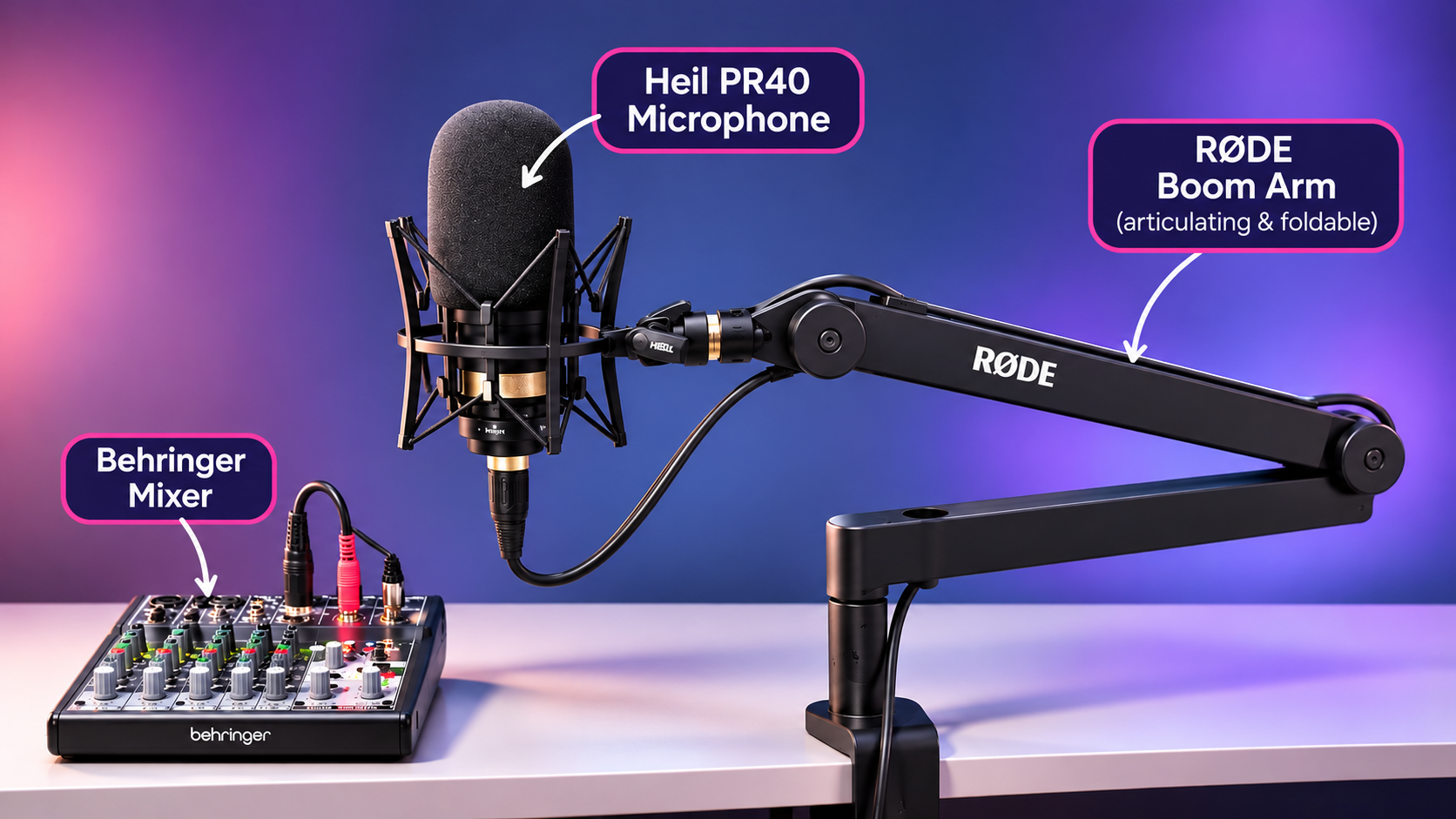
I also have a Heil PR40 microphone on an arm, with a pop filter, running through a Behringer mixer. It's a really good microphone. I'd also love fewer cords and less stuff around my desk, so simplifying that setup is on my list.
That's all the equipment I've owned for years of creating content. Please don't look at my microphone and mixer and turn them into a shopping list you have to finish before you can try this.
The first thing I'd do is make a test recording with whatever you have and watch it back. How does it sound, and how does it look? Then you have something real to work from instead of a list of things you think you need.
My audio setup, which I already owned from years of podcasting. It’s not a shopping list, so start with whatever you have.
QuickTime when I want to talk, Tella when I want to show you something
I've used both Tella and Descript for recording my screen and myself together. I prefer Tella, although QuickTime is still the easiest choice when I just want to sit down and talk.
What I like about recording the screen and camera separately is having those individual files to work with afterward. I can decide when you need to see me, when the screen should be the focus, and how the pieces fit together.
I'm also finding that I prefer speaking from an outline. I can use a script, and there are times when that makes sense, but some of my best observations happen when I go off-script. One thing triggers the next as I'm walking through something live, and those are often the juicy nuggets I never would have thought to write down beforehand.
So I may end up using my teleprompter to display an outline instead of a script. I like having a little guidance while leaving room to talk the way I actually talk.
It's also different when I'm walking through something on screen. Of course I'm going to look at the screen while I explain what I'm doing, and I don't feel the same pressure to keep my eyes on the camera.
The parts of Descript I'll miss
I canceled Descript, but there are two features I really like: editing the video by editing the transcript, and eye correction.
Working through the words like you're editing a document just makes sense to me. And the eye correction helped with the SaySo video, because I didn't like how obvious it was that I was reading.
I went back into Descript for that, along with a few edits to how I was speaking. I still have access through November 3, so I'll show you the pieces I've found helpful.
I'm building my own editing tools, and some of these adjustments are things I can already do in Scene Studio. I need to go back and tweak parts of the interface, though, and in that moment, dropping the video into Descript felt easier. So that's what I did.
That's a pretty good description of this whole process, actually. I'm trying things on real videos and paying attention to where I get stuck.
Where does Claude fit into making videos with AI?
Claude does a lot of the heavy lifting on the edit, and I still check the pacing myself. I talked about how I made the SaySo video in my previous video, so I won't walk through the whole thing again here. The short version: I recorded myself in QuickTime, Claude created the app walkthrough, and we combined the narration and footage.
Getting that edit right took three attempts.
Claude can do some fantastic things with video, but the pacing still needs a human eye. A cut can technically remove the mistake and still feel abrupt when you watch it back. I'm still working out how much space to leave between things so it feels natural.
What I want from editing is pretty practical: remove a restart, trim a long pause, help someone follow what's happening on screen, and make any zooms or pans smooth enough that you don't notice them.
And pull the bloopers together, because apparently those are staying. People told me they loved them, and I had fun including them.
I've been working with Claude Code and Remotion for the editing and motion graphics. I also have Hyperframes by HeyGen installed, but I've mostly stuck with Remotion because I've got a routine down with it. Hyperframes is worth knowing about, though. It's open source, there's a library of ready-made components to explore, and HeyGen has a media library that's free with a HeyGen login. I'll include the links so you can take a look without me turning this into an installation tutorial.
Scene Studio, the visual editor I've been building, is the other piece. It lets me make adjustments myself instead of describing every change in a prompt, and I'm planning to make it available for sale. I still have some interface work to do, but I'll show you where it's at and how I'm using it.
Not every second needs a motion graphic
Something I keep noticing in other people's videos lately: now that Claude can make motion graphics, they're showing up everywhere. Text flying in, icons bouncing around, a little animation on every sentence. I get the appeal, because it's genuinely fun to make them. (And Claude will happily add one to every scene if you let it.)
But motion graphics have to earn their spot. If it shows the viewer something they couldn't see otherwise, like how a workflow connects or where a setting lives, it's doing its job. If it's there because it looks cool, it's just noise, and it pulls attention away from what you're actually trying to teach.
So that's the filter I'm using for my own videos. Motion graphics come in when they demonstrate something; the rest of the time, it's me, my screen, or both. You'll see two graphics in this article, and each one is there to show you a process, not to decorate it.
Can you make a useful video without your face in it?
Yes, and the onboarding videos inside SaySo are a perfect example. SaySo is my product, but it's a standalone brand, and I don't need my face on everything. If you're trying to connect an account or set up your store, a clear demonstration gives you exactly what you need.
For some of these videos, Claude handles the screen demonstration and the narration, using a connection to my ElevenLabs account and a clone of my voice. I want you to hear one, because hearing the actual result is much more useful than me telling you voice cloning has gotten good.
I used a different approach for SPARK Lab. Claude recorded the demonstrations and gave me the narration scripts. I recorded the audio on my phone, AirDropped it to my computer, and Claude timed it to the video. That was it. That's how I made 11 SPARK Lab tutorial videos in one weekend.
Why 11 videos took a weekend, and one took hours
This is what clicked for me after the ChatGPT video.
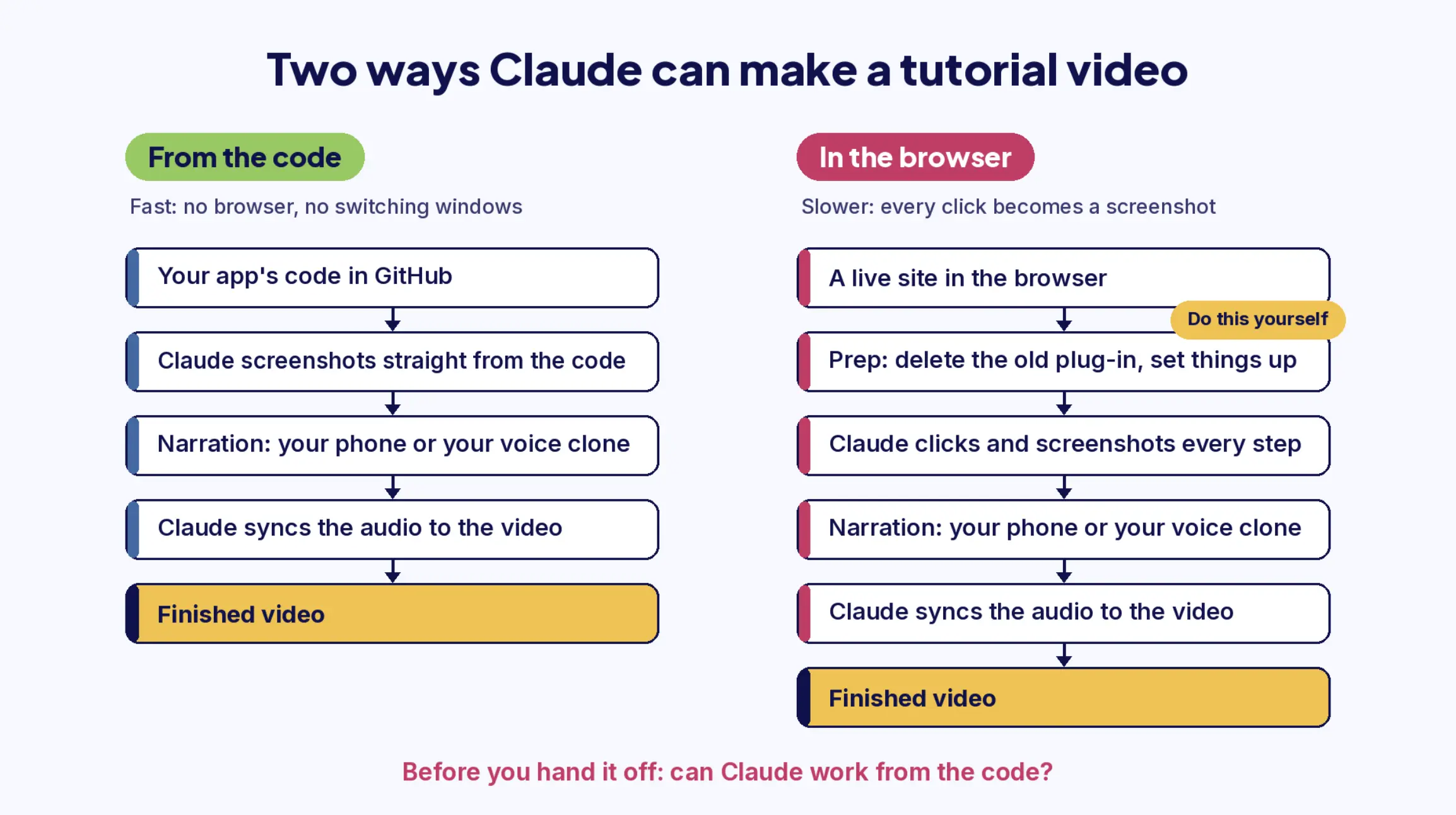
The SPARK Lab videos were fast because Claude was working straight from my code in GitHub. It could build the screens it needed from what was already there, so there was no browser to open, no windows to jump between, and nothing live to click through. It just made the video.
The ChatGPT video was a different animal. Claude had to drive a real browser, open ChatGPT, click through each step, wait for pages to load, and take a screenshot every time something changed. Every one of those moves takes time, and it was happening on the same computer I was using to work. Then add the prep steps that never needed to be recorded at all, and you can see where the hours went.
So now, before I hand off a video, I ask myself three questions:
Can Claude work from the code, or does it have to go click around a live site?
What can I take care of myself in a minute?
What actually belongs in the video?
And if you don't have an app of your own, the same thinking works for any screen recording: do the setup yourself, then hand off only the part that's the actual lesson.
When Claude can work from the code, the video comes together fast. When it has to click through a live site, every step becomes a screenshot, so do the setup yourself first.
If you'd rather explain something in your own voice without appearing on camera, recording your own narration is a perfectly good place to start. Your voice carries a lot of you, even when your face isn't on screen.
These videos help people use something they've bought or joined. They're another way video supports the business, even when they aren't bringing new viewers in from YouTube.
All the ways I'm making videos right now
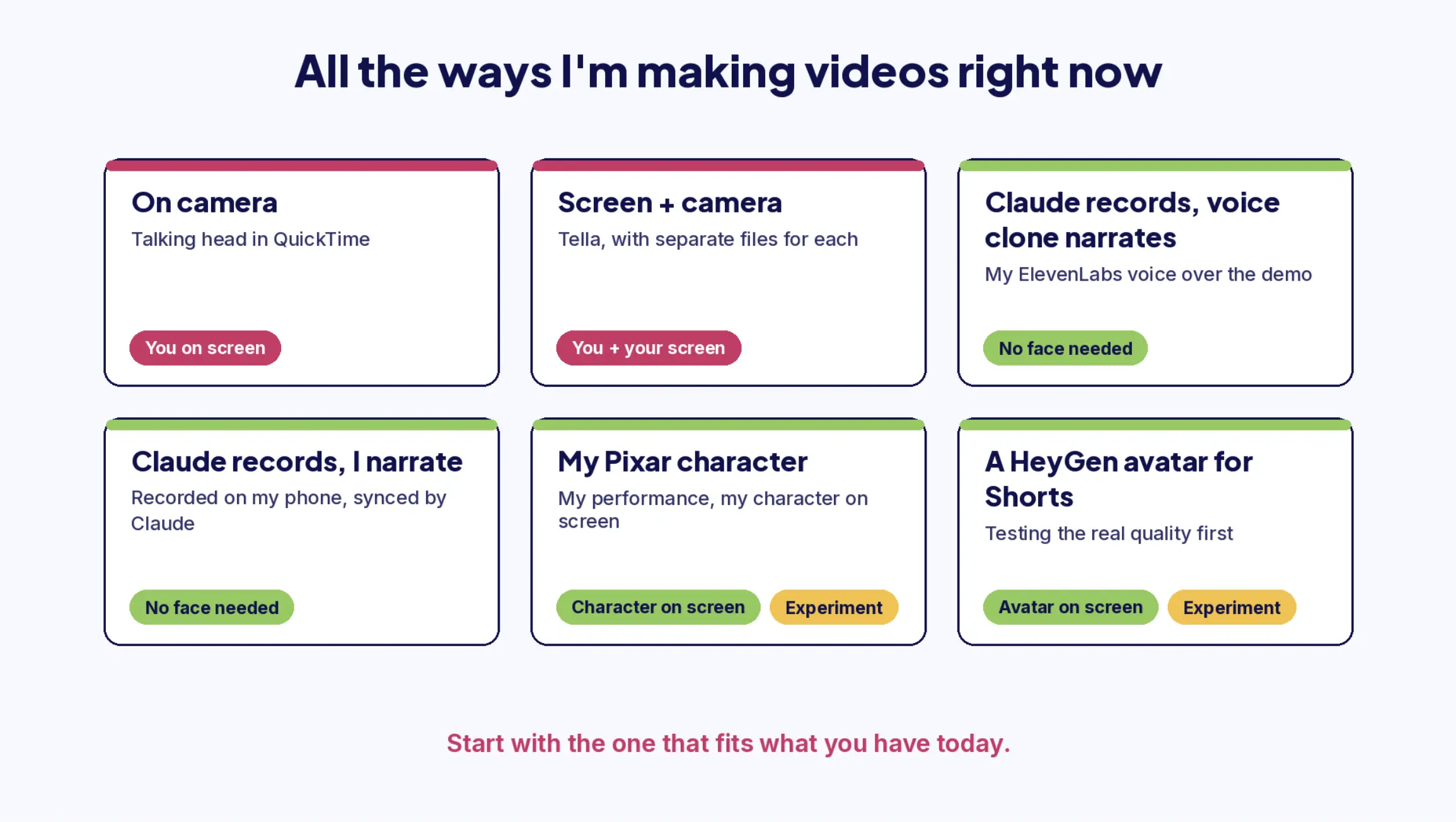
When I lay it all out, I'm making videos in more ways than I realized, and only some of them need me on camera.
Only some of these need me on camera. Pick the one that fits what you have today and start there.
You don't need all of these. Pick the one that matches what you have today and how you feel about being on camera, and start there.
A few experiments I'm curious about
The first one comes straight out of that ChatGPT video. Claude Duet is Claude's new agent, and I want to see whether it can make a video like that overnight, without me. If it needs the screen on, I'd set up my laptop in another room and let it work while I sleep. If that works, a video I'd normally have to block out time for just shows up in the morning. I'll let you know how it goes.
I've tried Open Screen once, and I want to spend more time with it before I say much about where it fits.
I'm also interested in recording a video and putting my Pixar-style character on screen in place of my camera footage. I'd still be the one performing, but the character would be what you see. That feels like a fun way to bring my personality into a video on days when I don't feel like being on camera.
And I want to test a HeyGen avatar of myself. My long-form videos are going to be me or my Pixar character, but I'm happy to be the one who tries this so you can see the real quality instead of a polished demo. I can see an avatar being genuinely useful in Shorts, and possibly in tutorials, where someone needs the information more than they need my actual face. I'll share what I learn, the good and the not-so-good.
One person who has expanded my thinking about what's possible with AI video is Natalie Nicholson. Her article, "You Don't Have to Be a Filmmaker to Make an AI Short Film (But It Helps to Think Like One)," walks through the process behind her animated short, Wilbur C. Fibbermust.
The film is beautiful, and the way she thought through the story, the sound, and each scene has me thinking differently about how a video comes together. I love learning from people who are experimenting and sharing what they discover along the way.
You get used to seeing and hearing yourself
I want to say this because I know I can look comfortable on camera: I've had a lot of practice.
I had a podcast for ten years, so I'm really used to hearing my own voice. I've made videos for years, too. I even had a short stint as a speech major in college, and I've always had a bit of a performer in me.
Right now, I don't pay much attention to watching or listening to myself. But there was a time when I wasn't used to it.
That doesn't mean you need ten years to feel comfortable. Some discomfort just becomes familiar the more you do it.
If you want a low-stakes way in, record a short explanation of something you regularly help a customer or subscriber with. You don't have to publish it. Watch it back and ask yourself whether someone could follow along and hear you clearly.
You'll probably notice things you want to adjust. You might also find you have more to say than you expected once you get going.
Quick answers about making videos with AI
Frequently Asked Questions
Can I make YouTube videos without showing my face?
Yes. My SaySo onboarding videos use my ElevenLabs voice clone over a screen demo, and my SPARK Lab tutorials use narration I recorded on my phone. Neither one needs me on camera.
Can Claude Code record a tutorial video for me?
Yes, and it's fastest when it can work straight from your code. When it has to click through a live site in the browser, it takes a lot longer, so do the setup yourself first and hand off only what belongs in the video.
Do I need a good microphone or camera to start?
No. Make a test recording with whatever you have and watch it back. My webcam dates back to 2008, and it's still doing the job.
Can ElevenLabs sync my voiceover to my video?
ElevenLabs Studio can put your voiceover and your video on the same timeline, but you line them up by hand (ElevenLabs help). I'd rather narrate loosely and let Claude handle the timing.
A starting prompt for video in your own business
If you're thinking about video but haven't figured out what you'd make, this gives you a place to begin. You can use it in Claude or ChatGPT.
Anthropic, Stripe, Zoom, Kit, and Resend keys
Help me find a practical starting point for using video to bring relevant people into my business.
Interview me one question at a time. Ask about my business, who I help, what I sell, the questions customers ask, where I currently publish, and what I want someone to do after watching. Also ask about my equipment, my availability, and my comfort level with appearing on camera.
Use my answers to suggest three specific video ideas. For each, explain the viewer's problem, what I could demonstrate or explain, how it connects to my business, and an appropriate next step for the viewer.
Recommend one idea to start with and the simplest way to record it using what I already have. Give me a bullet-point speaking outline and identify anything worth showing on screen.
If any of these could work without my face on camera, or could be recorded by an AI tool from a screen demonstration, point that out. Flag any setup steps I could do myself in a minute instead of recording them.
Keep the plan manageable. Don't assume I need new equipment, a polished studio, or a particular video length.
That ChatGPT video is finished, and the next one will be much faster because of it. I'll keep sharing what I'm trying as I figure out how to make videos with AI, including the bits that take three attempts and the bloopers that make it into the final edit.
If you've been thinking about giving video a shot, what's the first thing you'd like to make?
Your obvious offer is hiding in plain sight.
Free. Tell it what you know and who you help, and it'll show you the offer everyone can see but you.
Kim Doyal is a digital marketing strategist and AI builder with 18 years of online business experience. She is the founder of AI Spark Studios and SPARK Lab, and the creator of The Hub — a custom 33-agent AI operating system that runs her entire business. She has also built kimdoyal.com, StackRewards, and multiple AI tools and agents using vibe coding, a natural language approach to building software without a traditional development background.