HOME/BLOG/HOW TO EDIT VIDEO WITH CLAUDE (EVEN IF YOU'VE HATED EVERY EDITOR YOU'VE TRIED)
AI Building
How to Edit Video With Claude (Even If You've Hated Every Editor You've Tried)
A week of testing Claude on video, and the tool that came out of it.
October 11, 2026|5 min read
This whole project feels a little bit like Inception. You go in, and then you go one level deeper, and then you notice a thread that leads to another thread, and you pull that one too... which, honestly, is some of my favorite kind of work.
In the last couple of weeks, I started to edit video with Claude, and I made a handful of videos doing it. One came from an HTML file, one from my GitHub repo, and one from a video I'd already published. Then, because I can't help myself, I handed Claude this article and had it turn into a video as well. You'll see all of it below.
But first I need to tell you how I got here, because it starts a long time ago, with a comment that had a little bit of an "ouch" in it.
What does a comment about feeling dizzy have to do with Claude?
Early in my video days, a viewer told me I was making them dizzy, and I've been working on slowing down ever since, which is exactly why what Claude did with my zooms and pans surprised me so much.
I jumped into video early, back when YouTube was still very new. A friend told me I should get people to watch my videos on a property I owned instead of on YouTube, which sounded like good advice at the time, so I did exactly that.
I have no idea how many views I lost by doing it, but that's alright... live and learn. 🤷♀️
The comment on one of my videos said I needed to learn how to use the software. It was direct, and yes, it stung a little, but mostly I thought, "he's not wrong"...
I get zippy about things. When I'm walking through something live, one thing I'm excited about triggers the next thing, and the screen follows my train of thought around the room. (It's also why I work from an outline instead of a script... the natural flow of working through things is actually easier for me than reading a script).
Over the years, I slowed down. I'll give myself a pat on the back for jumping in, figuring out the software, and getting a little better each time.
And the software itself... I think about how many versions of Camtasia I bought and used, and the honest truth is that I always hated editing. A few years ago Descript changed that for me, because suddenly I could edit video by striking out text.
Now I can edit video with Claude (and I haven't even tried Codex yet), and I'm blown away. When you've done something the hard way for years, finding an easier way to do something that you want to do, but don't have the bandwidth to learn another piece of software, it feels like winning the time lottery.
What did Claude do when I handed it a video I'd already published?
It started on motion graphics, and along the way it asked me a question I did not see coming.
I did this as a test. The video was already published and already sitting in Descript, and I handed it over to see what Claude would do with it. Partway through, Claude asked me, "Do you have the logos, or do you want me to get them?"
And I said, "You go get them."
That was the moment I was really blown away. It's a small thing, which is probably why it hit me the way it did. Claude wasn't just doing the task; it asked what would help, then offered to go find the pieces itself.
From there, I asked Claude to create a motion graphic, an actual animated video, and it did. I recorded the audio over it myself, and what you're hearing is that same moment, the "You go get them" part, told in my own words.
Can Claude make a screen capture video without me recording anything?
This one started out of pure curiosity. I asked, "If I gave you a screenshot, could you animate it?" and I explained what I was looking for. I didn't even know it could take something that would normally be a screen recording and just... make it.
So I asked what would be most helpful to give it, and Claude said HTML. I handed that over, and it built the animation. Then I asked, "Could you do the whole app?" and that's when Claude told me about the GitHub repo: connect me to it, and I can work from there.
(I build full apps, and that one still blew my mind.)
For the SaySo trailer, I gave Claude access to the repo and dropped in the music, and it made the video. Here's the part where it says, "Add what you're selling."
And here's the funnel builder walkthrough. That one came from the HTML handoff, and it starts with the full view and then zooms in to the actual funnel builder.
But here's where it gets interesting, because what surprised me most wasn't the animation. It was the zooms and pans.
When I record my own screen, I get excited, and I go off on side tangents, or I follow my mouse around, or I follow whatever my train of thought happens to be doing at that moment.
Claude chose the zooms and pans that were helpful to the person watching. It followed what mattered on the screen instead of following me, and after all those years of working on slowing down, that was the most impressive part of the whole thing.
How do I edit video with Claude myself?
Start with a video you've already published, hand it to Claude, and ask for something small, like motion graphics. That's all I did.
Here's how I'd go about it:
Pick a video you've already published. I used one that was already sitting in Descript. Choose one you won't be precious about, because this is a test. Or record a quick video (short, maybe 3 minutes).
Hand it to Claude and say what you're looking for. I asked for motion graphics. Explain it the way you'd explain it to a person, because that's what worked for me when I asked about animating a screenshot.
Ask Claude what would be most helpful to give it. That question is how I found out HTML would work, and later how I found out about the GitHub repo.
Answer what it asks you. Mine asked about the logos, and when I tested Sonnet on SPARK Lab, a gated login, it told me about the roadblock instead of guessing. You may get a different question, and that's half the fun.
Look at what came back, and notice the language you used to get there. That's the skill you're building.
What if I don't have a published video yet? Start with a screenshot, the way my second test did, and ask what would be most helpful to give Claude. That one question took me from a still image to an HTML version to the whole app, and I just kept asking the next thing.
I'll say this part plainly, because I think it's the most useful thing I learned: don't go into this with the idea that you're going to produce a video. I highly recommend people just test. Get comfortable with the language, with trying things, with seeing what happens.
By the language I mean how you describe what you want, how you answer when Claude asks you something, and how you ask what would help. All three are skills, and you build them by trying things, not by planning them. The producing comes later, and it's a lot easier once you've played.
Where did Scene Studio come from?
From a screenshot and some annoyance.
When Opus 5.5 came out, I saw the announcements about everything it could do with video, so I went looking for people showing it off. It's a great model, and there's a lot to see. But in the videos I watched, I kept running into missing pieces, and I never got a complete explanation of how it all fit together.
(I run a paid community of my own, so I'm not bothered by the idea of one. It was the missing pieces that got to me.)
One of those videos came from an AI YouTuber who moves through everything very quickly, and partway through he showed a piece of software that did exactly the thing I was trying to understand. I looked it up, and it turned out to be his own software. The only way to access it was to upgrade or sign up for his $97-a-month Skool community.
This model => YouTube video to Skool community feels a bit like the new ClickFunnels model... It's great that it's working, but soon I'm going to use the skill I built to watch the YouTube video for me and see whether access to what they're showing is gated. 🙄 Businesses don't need to give everything away; that's not what I'm saying, it's the "here's how to do it, but not really" shtick that bugs me.
Back to what happened...
I was annoyed. So I took a screenshot of the software, opened Claude Code, and said, "Let's build this."
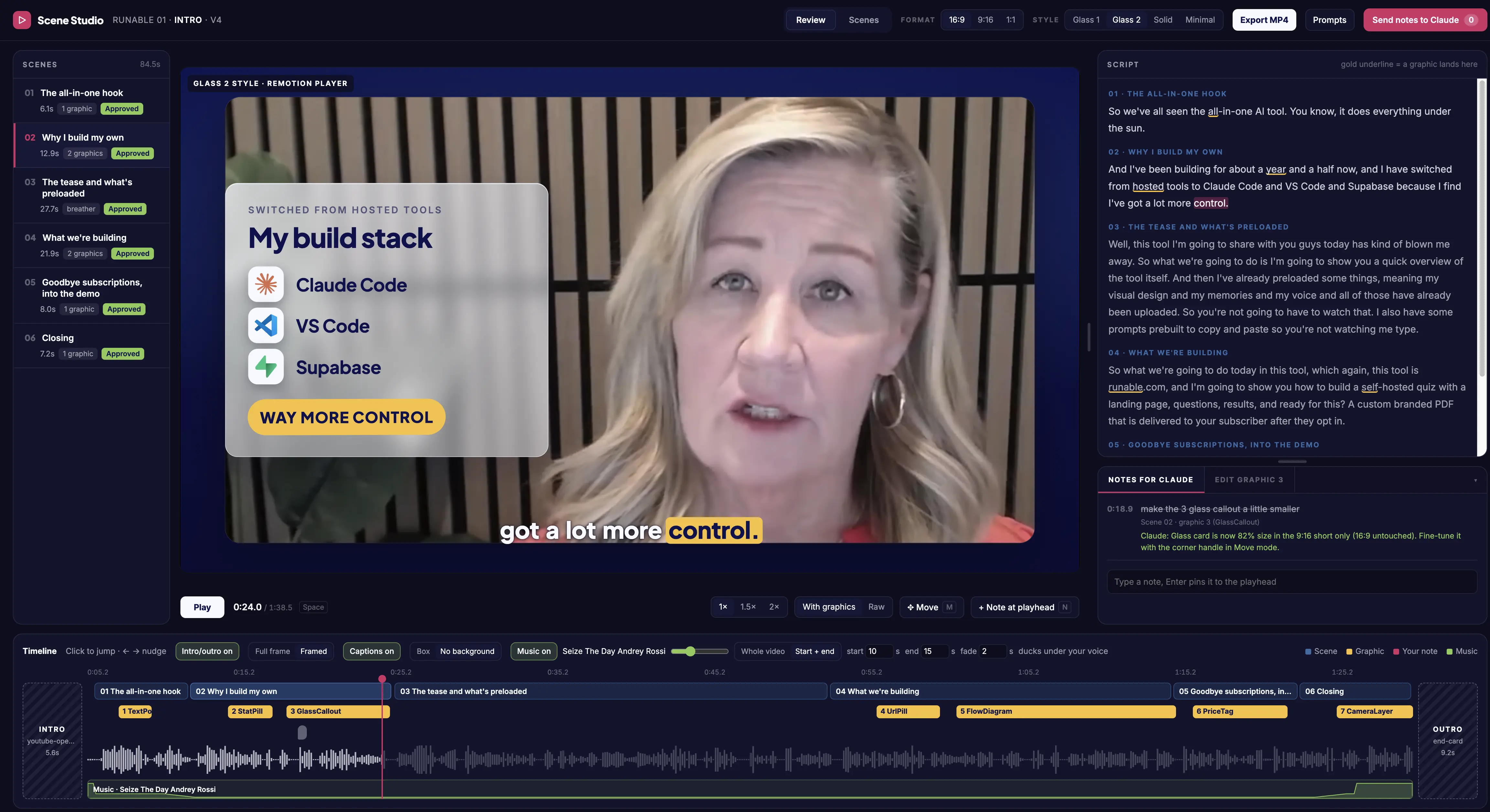
Scene Studio, with the video on the left, the scenes down the side and the script on the right. I can leave Claude a note right at the playhead, which is how I asked for that glass callout to come down a little in size. (You can see Claude’s reply under my note.)
That's the whole origin story, and it's the reason Scene Studio exists.
I'm telling you because I want you to see what's possible here, and it wasn't a long plan. It was a screenshot and one sentence to Claude. (It's the same move as my second test, by the way. I keep handing Claude a screenshot and asking what it can do with it.) 🙃
Nothing went sideways or broke along the way, because I wasn't trying to produce a finished product. I was simply jumping in and testing.
What do I need Scene Studio for if Claude does the editing?
You don't need it to hand Claude a video. What I wanted from it, because I'm a visual person, was to see where Claude broke the video into scenes, where the callouts landed, and what other ways I might want to use it.
Claude does the heavy lifting. Scene Studio lets me review the result and tweak it. I can see the scenes, text overlays, and styles; switch between 9:16, square, and 16:9; and edit the overlay text myself instead of asking Claude to redo it, which saves credits.
Seeing the scenes laid out also changes how I think about the next video, because I can spot where a callout belongs or where a scene runs long before I ask Claude to change anything.
I made it for people who want to do more video but get stopped by editors that feel hard to learn. I wanted you to watch a video come together before you reach the end, instead of crossing your fingers and waiting.
I built it with Claude Code, and it's packaged as a Claude plug-in. It's a one-time $47, with lifetime updates.
Before I open it up, I'm running a waitlist instead of a pre-sale, so you can put your name and email down at kimdoyal.com/scene-studio and I'll let you know when it's ready. And if you can follow instructions, you can do this.
What does this change if I'm a solopreneur or I have a small team?
I think you have more time and bandwidth for video than you think, and editing is usually what eats it up.
Some people already know their way around an editor, and some don't, and I think both groups benefit from AI video editing. For me, the shift is in where my attention goes. Instead of getting stuck in show-and-tell screen capture, I can focus on building better video workflows, scripts, and structures, and on the video itself.
Look at the arc I've been through... I went from buying editor after editor, to striking out text in Descript, to handing Claude a video and answering its questions. Each step took more mechanical work off my plate and left me with more thinking.
The part Claude can't hand me is knowing what the video should say and who it's for. That comes from experience, and it's exactly the part I get to spend my time on now.
And if you've been telling yourself you don't have the bandwidth for video, I'd gently ask whether the real roadblock was the editing. (For me it was, and I bought several versions of Camtasia along the way.)
How did Sonnet 5.5 do?
Pretty well, though rougher than Opus, and the part I want you to remember is that Claude told me when it hit a roadblock.
Everything above was tested on Claude Opus 5.5. I wanted to know whether Sonnet 5.5 could do some of this too, so I connected it to the SPARK Lab repo and asked for a walkthrough of SPARK Lab, the same way I did with SaySo.
SPARK Lab is gated, so there was a point where Claude couldn't just go and look. Instead of guessing, it stopped and told me. It made a copy of the repo on my local machine (that's my assumption, but it's what it looked like) so it could get to everything it needed, and from there we kept going.
On the first pass we changed two things. We changed the music, and I asked it to use the Mac mouse pointer instead of a little dot. (Small things, and exactly the sort of thing I'd have fiddled with in an editor for an hour.)
The one thing I had to do myself was provide the images, because Stencil serves all of its images from its own servers, so Claude couldn't pull them from the repo.
To be straight, the colors were a little off, and it was rougher than what I got with Opus. But Sonnet did a decent job; I'm happy with the video, and I'll probably use it. I'd still recommend Opus 5.5 for this.
And the lesson I'd take from the gated login is the same one from the logos: when Claude hits a wall, it asks, you answer, and you keep going.
How did this article become a video?
I handed the outline to Daria's Video Director, one of the amplifiers in her Amplifiers library, and it turned the outline into a video.
It came back first with a full production brief: a hook, a script, a shot list, a style, and a sound plan. I approved the direction, and then Claude built the video. That's the video above that was motion graphics only (the one where I said someone told me I made them dizzy, lol).
I recorded the voiceover on my phone, and Claude timed every shot to my actual pauses. It also built the screens, the animation, and the end card in code, in my brand colors, and made sure the video mapped the audio correctly. Keep in mind, I dictate as much as I possibly can, so like all other Claude chats, it interprets natural language great (I'm doing this all in Claude Code in the desktop or web app).
(Full credit to Daria for the Video Director amplifier.) 😂
That's the Inception part. You read the article, watched the video, and the video was made from the article you just read (I planned to create a complete video walkthrough from this article, but a migraine derailed my week last week; I'll probably do that for my YouTube channel).
What else might you be wondering?
Frequently Asked Questions
Do I need to know how to code to edit video with Claude?
o hand Claude a video you've already published and ask for motion graphics, you don't write any code. You just ask. I got into code later, when I asked about the whole app, and Claude told me to connect the repo.
Which Claude model should I use?
started on Claude Opus 5.5 and did most of my testing there. I also ran a SPARK Lab walkthrough on Sonnet 5.5, and it did a decent job, though the colors were a little off and it was rougher. Claude told me when it hit a roadblock (SPARK Lab is a gated login), and we worked through it. I'd still recommend Opus 5.5 for this.
Why did you build Scene Studio instead of using an existing editor?
I saw a piece of software in a video that did what I wanted, and the only way to get it was to join the creator's $ 97-a-month Skool community. I took a screenshot, opened Claude Code, and said, "Let's build this."
What do I need to run Scene Studio?
It runs in the Claude desktop app with Claude Code enabled, so you don't need VS Code. It comes with full install instructions. You'll need to install Remotion Studio (free) and I'd suggest Hyperframes, too.
Does Scene Studio work on Windows?
I built it on a Mac, and I haven't tested it on Windows yet. I'm creating a Windows version and going to ask a friend to test it. I'll le you know when it's available,
Do I have to buy Scene Studio to try this?
No. Handing Claude a video works without it. Scene Studio is for seeing where Claude broke your video into scenes and for editing the text yourself. You can also resize it in Scene Studio, send notes to Claude, and manually edit a few other things (using fewer Claude tokens).
Can Claude make a video of my app without me recording a screen capture?
In my case, yes. After the HTML version worked, I asked about the whole app, and Claude said to connect it to the GitHub repo. That's how the SaySo trailer got made.
What if I'm not ready to make a finished video yet?
Then don't make one. Hand Claude a video you've already published and see what it asks you.
What if I'm not ready to make a finished video yet?
Then don't make one. 😉 Hand Claude a video you've already published and see what it asks you. You can also give it a landing page, article, or anything else you think might make an interesting video just to get a feel for how it works.
What will you hand Claude first?
I'd start with something super simple. Give it a video you don't care about, record one, or give it an article and see what it comes up with. Hand it over, ask for something small, and let Claude ask you its questions.
I want you to finish this article thinking, "Oh my God, this is way easier than I thought," because that's exactly how I felt when I realized I could edit video with Claude without learning another editor.
And then, if you feel like it, keep pulling the thread. It gets deeper... in a good way.
If you try it this week, reply and tell me what Claude asked you. I'd love to hear whether it asked about the logos too.
Your obvious offer is hiding in plain sight.
Free. Tell it what you know and who you help, and it'll show you the offer everyone can see but you.
Kim Doyal is a digital marketing strategist and AI builder with 18 years of online business experience. She is the founder of AI Spark Studios and SPARK Lab, and the creator of The Hub — a custom 33-agent AI operating system that runs her entire business. She has also built kimdoyal.com, StackRewards, and multiple AI tools and agents using vibe coding, a natural language approach to building software without a traditional development background.